6/7/2017

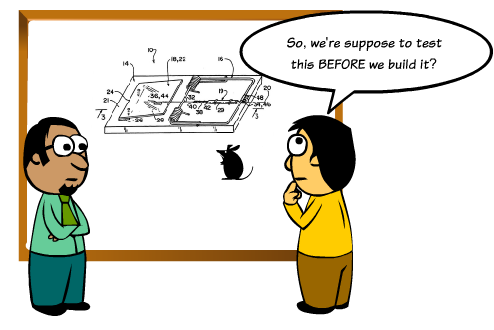
It’s week 9 at Makers, and I’ve noticed a recurrent theme: the importance of TDD (test-driven-development) and why people (i.e. me) struggle to get round to doing it.

So I’m going to write three blogs on TDD addressing why TDD is important, how to do TDD, and possibly most importantly, how to motivate yourself (me) to do TDD better.

So here are some questions about why programmers should bother with TDD:

1. Why not just write the code correctly in the first place?
Definitely a good idea to write good code — but your code will inevitably change. Example: I wrote a rails app a few days ago and used the Devise gem for user authentication. I wanted to style the forms, so I changed some buttons to a link. I was proudly showing off my beautiful creation to a friend when the buttons stopped working (good tip: rails forms default to a POST request and you have to specify if you want GET — I hadn’t done this, which is why my code broke). If I’d had a feature test, I would have known right away that my routes had broken when I changed the form.

2. Doesn’t writing tests takes away time from adding features?
But it gives you the time back in debugging those features later. Even if you manually inspect your site (for example), you still have to reload the server (depending on which server you’re using), possibly clear the cache, and run the tests yourself. Much easier to run RSpec (or whatever testing framework you use) and have it tell you the exact line of the error, and possibly even how to solve it.

3. Wouldn’t you rather be writing features?
Doing good work means sometimes you have to do something that’s less fun in pursuit of an overall goal. Violinists play scales, athletes do something athletic, programmers write tests. It’s part of the less glamorous part of our job that means we are way better at our job. And we want to be kickass programmers, right?

4. But doesn’t writing tests just make the whole process slower?
Not so much slower as break it down into smaller steps! The idea of sitting down at a machine, typing furiously for six hours, and emerging with your keyboard smoking and an amazing app fully developed is really sexy. But even if you manage to do that perfectly, your app will have to change — and possibly even be changed by someone else who may not have your brilliance and depth. Much better to code in tiny pieces, each new bit being tested so you can immediately pinpoint problems.

5. Is there anything else great about tests?
Yeah! They satisfy the XP value of communication: tests tell the next programmer maintaining your code what exactly it’s meant to do. I’m struck by how often my coach asks to see my tests — it’s a quick way to get an overview of what the code is meant to do. Also very importantly, tests demonstrate that you’ve accounted for edge cases — so think of them as an opportunity to show off how expansive your thinking is.

Ok, so that’s it for post one. Check out the next one: 5 Steps to Good TDD

Pair programming is a hot topic these days — everyone knows it leads to better code — but it’s also one of the most difficult things to do. At Makers Academy, where I learned to code, we only did pair programming , so here’s my two cents worth of advice for being a great pair partner.

For newbies to pairing, the most important is to understand the driver/navigator roles. The driver is the one typing the code, the navigator sits back and researches, proofreads, and maintains a global view of the code and the project’s direction.

1. Recognise that pairing is hard
Pairing is an intense relationship, summoning all your powers of ingenuity, communication, humour, and code. If you find it hard, or even just tiring, it’s because it is hard and tiring sometimes. But you can also make it easy with the right person and the right set of practices.

2. Listen more than you speak
I guarantee if your focus is on listening more than you speak, the result will probably be a 50/50 split. Most of us love to focus on our own ideas without really being present to the person next to us.

Listen actively: listening doesn’t mean you’re silent but inattentive. It’s a very powerful act requiring your full attention and presence to take in what the other person is giving you.

Exception: if you are very quiet generally, you may in fact need try to speak more than you listen to get that 50/50 split.

3. Ask questions — don’t command
Bad: ‘Assign that variable to equal “potato”.’
Good: ‘What do you think that variable should point to?’

Questions make your pair think and open a dialogue. Telling them the answer just makes you look superior.

4. Switch roles every 25 minutes
This is probably the most important skill! It’s easy to be a keyboard hog, and it becomes really annoying for your pair to have to request keyboard control. Every 25 minutes is a fair split, and it will keep you from getting in a rut.

5. Take regular breaks
And make them good breaks! Play music, meditate, go into the garden…do NOT code without your partner in the breaks! You’re in this together.

5. Give feedback
Ouch. This is hard. But so worth it. Full disclosure: I’m bad at giving helpful and kind feedback, so I’m not going to offer much advice here. But a good one to start with is 1) what went well 2) what can we improve for next time

6. Don’t pair 100% of the time
Like I said, pairing is intense. You’ll need some alone time to code so make sure you get that too.

7. Don’t interrupt
Interrupting == you weren’t listening. I don’t mean the kind of interruption that takes the other person’s idea and enthusiastically expands on it. I mean the kind of interruption that abruptly changes the topic of conversation. This says that you don’t value your pair’s opinion.

8. Say yes
In the time it takes to discuss whether it’s worth trying something, you can often just do it. Saying yes creates a positive atmosphere where your pair is respected. Arguing about it is just, well, arguing.

9. Be mindful of your body language
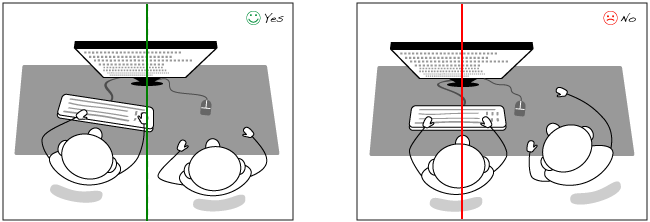
Is your back to your partner? Is your computer screen angled away? Do you never look at them? You want to create an atmosphere of inclusion so your pair feels respected and welcome to comment.
​​


10. Give high fives
Just completed a mother of a mission? High five! You go through the lows together — make sure to celebrate the highs.

Have some more suggestions for great pairing? Comment or sent a tweet my way!

​Keep your eyes peeled for a post on remote pairing!

And want a little laugh? https://www.youtube.com/watch?v=dYBjVTMUQY0

10/11/2017

Baking (session?) cookies:

  • Pre-Heat the oven to 350.
  • You spend ten minutes on Stack Ovenflow figuring out why your oven doesn’t have this temperature, until you release that it’s an American recipe with degrees in Fahrenheit.
  • Measure out and combine the dry ingredients in a bowl and set aside.
  • You will then completely forget to use them.
  • Cream together the butter and sugars until mixed.
  • 89% of the mixing will happen in the first 5 seconds and the remaining 11% will take ten minutes. There is a random chance that your mixing will be refused entirely but if you try again it will mysteriously work.
  • Add in the egg, vanilla, honey and peanut butter. Blend until smooth.
  • This step goes easily and you get cocky and stop paying close attention.
  • Add in the dry ingredients and mix well. The batter is quite thick, you’ll know it’s mixed well when your arm starts to hurt!
  • As above, you’ve forgotten all about the dry ingredients and you jump straight to “mix well”. You mix for 20 minutes and sprain your wrist before you think to read the instructions more thoroughly and add the dry ingredients.
  • Using generous rounded tablespoonfuls, place into roughly circular shapes on a baking tray. (You should get 12 exactly).
  • You spend 1.5 days trying to find out from the business team what exactly a “rounded tablespoonful” and “roughly circular” are.
  • Put into the center of the oven for 10–12 minutes. I do 10 minutes which gives you a slight crunch on the outside and a velvety smooth inside. If you prefer a crunchier cookie, do 12 minutes but no more. Any more time and they taste burnt!
  • You haven’t tested your cookies before your guests arrive and you’re using a waterfall delivery system so you put all your cookies on one tray. You then get distracted by your guests and burn the cookies and have to send to Deliveroo for more cookies.

With thanks to Nigella!

10/7/2017

Pair programming is recognised as a way of writing great code, but can remote teams do it?

Absolutely! I did my entire Makers Academy course remotely and I paired remotely everyday. It definitely has some benefits over in-person pairing and I think it’s a great way of working.

If you haven’t already, read my article 10 Tips for Great Pair Programming — this post assumes you’ve read it. The most important tips from that article? Swap driver/navigator roles every 25 minutes and listen more than you talk.

The main difference with pairing remotely is that you have to be a bit more intentional about your communication. Here are my 5 tips for communicating well virtually.

1. Use your camera
The major drawback of pairing is that you lose body language communication. You can in large part make up for this by turning on your camera and making sure your pair’s camera is on. I like to use Zoom for pairing as the screenshare/camera work well together.

2. Check in with your pair
Before you start working, make sure to ask your pair how they’re doing — the same way you would in person. Maybe even have a virtual cup of coffee together in the morning!

3. Take good breaks
This is one of the major benefits of working remotely — you’re in your own space so on your breaks you can easily meditate/pop outside to the garden/do your laundry.

4. Create a dummy branch
Swapping driver/navigator roles regularly is critical for healthy pairing. If you’re concerned about pushing experimental code to git, create a dummy branch that you can push to in order to swap your possibly embarrassingly rudimentary code — then you can start using the real branch when you have passing tests.

5. Virtual high fives
Totally a thing. The key is to slap the camera (almost) with one hand and slap your thigh with the other to get the sound. If you want a slightly ironic high five, you can facepalm at the same time.

Re-“Makering” Your Life

7/14/2017

I had a great chat yesterday with the new Makers Academy remote cohort, discussing feeling inadequate, strategies for learning, how soon to send a CV to employers, and myriad other topics. This morning I found myself reflecting on how I used Makers not just to learn to code but to reset my life.

A bit of background: my previous job was as a professional violinist. I was doing a lot of international touring, working as a freelancer. This was stressful because of the constant travel (between November 2016 — January 2017 I was in ten countries on 3 continents), the uncertainty of a freelance income, and the inability to plan downtime.

The intense experience of Makers forced me to look at my life and understand where I received sustenance; to make sure I was getting enough sleep; to develop patterns that made me a good coder but also a joyful human being. So I decided to seize the opportunity to use my Makers experience to set healthier boundaries between my work and personal life. ​

Here are six things I did that helped transform my life:

1. Resist peer pressure to overwork
I remember vividly coming back from a five-minute pomodoro break and asking my pair how his break had been. He said, ‘Oh it wasn’t much of a break — I spent the time researching.’ I’d gone into the garden and smelled some flowers. Guess which of us was better prepared​ for work? As the course went on, my cohort challenged each other to take healthier breaks: play music, take photos of bees, read Stack Overflow’s programmer jokes page.​

2. Ask yourself what’s the best thing you can do for your learning
For me on the course, if it was during lunch or after 6pm, the answers included:

  • Go to the gym
  • Take a walk
  • Call my friends/family
  • Go to the pub
  • Read some fluffy fiction
  • Colouring-in​

Only on two days during the course, both at the final project, did I do any code in the evening. And to be honest, one of those nights I was just sitting watching my teammate code because I wanted to be social.

And one memorable morning my pair and I were too knackered to do the diagram workshop, so we did a hip-hop Bollywood dance workout instead.

The answer to this question will be unique for everyone but it’s really important to ask it and understand that the answer may very well not be ‘write more code’!

3. Don’t compare yourself
Rather than looking at what the other people in the course have done, ask yourself these two crucial questions:

  • Am I a better developer than I was yesterday?
  • Am I having fun?

If the answer to those questions is ‘yes’, then you are doing just fine.

A great way of being able to figure out the answer to those questions is to use the pomodoro technique and at the end of each pomo, write down what you did. You will be surprised and happy to realise how much you’ve learned, even as you’re struggling and frustrated.

4. Ask your coach or Dana if you’re worried about your progress
One of the most difficult things for me, especially at the beginning of the course, was not having much awareness about what I didn’t know and how I was progressing. Was I learning enough, not enough, pushing myself too hard? It’s impossible to know this as a newbie coder, but as adult beginners we are keenly aware of a vast skills chasm.

So talk to your coach if you want to find out how you’re doing — but be warned, have specific ideas (i.e., I struggle with ‘attr_readers’ and ‘instantiating objects’). The act of having that conversation with yourself is in fact a really valuable part of learning, reducing the terror from ‘Oh my god, I don’t know anything’ to ‘Here are three specific things I don’t know and can I get some help learning them’.

If you’ve done that and you’re still full of anxiety, talk to Dana. She will help — and not by patting you on the head and saying you’re great but actually by helping you discover these thoughts that are tearing you down and realising that the reality is a lot kinder.

5. Be kind to yourself
I can’t say enough how brave you are for doing the Makers course. Taking three months off work is difficult! You will struggle. You will be frustrated. But that’s such a good thing — it means you are being stretched, that you’re growing. Lots of people talk about making big changes in their lives, but you’ve actually had the courage to go for it. Remember that, and be proud of yourself when the going gets rough.

6. Ask yourself what’s the bravest thing you can do in that moment
Maybe it’s meditating instead of smoking. Maybe it’s shutting off the computer and reaching out to a friend. Maybe it’s admitting your vulnerability. Maybe it’s asking the ‘dumb’ question that’s actually on everybody’s minds. Maybe it is writing more code! The answer will look different for everyone, and will change frequently. And if you’re really comfortable with your pair, you can ask them this question too.

And if you feel like sharing, tweet me at @FiddlersCode with #BraveMakers and let’s all celebrate these moments!